

How to Deliver Results: Project Management Skills for Assistants
You have five priorities competing for attention, three deadlines that cannot move, and multiple people waiting for answers. No one calls it a project, yet you are expected to deliver results, keep everyone aligned, and make it all look effortless.
If that sounds familiar, here is the truth many administrative professionals overlook: You are already doing project management.
Today’s administrative professional does far more than complete tasks. You are a strategic partner, a problem solver, and often the central force behind how work gets done. From coordinating office moves to onboarding executives, you plan, organize, communicate, and drive outcomes across people, timelines, and priorities.
Project management is not optional. It’s one of the most powerful skills you can develop to elevate your performance, reduce stress, and clearly demonstrate your value. When you apply project management structure to the work you already do, you move from reacting to requests to proactively delivering results.
In this guide, you will discover what project management looks like in your role, why it matters, and how to apply practical techniques to increase clarity, confidence, and impact.
What Project Management Looks Like for Administrative Assistants
At its core, project management is the process of planning, executing, and overseeing work to achieve a specific outcome within a defined timeframe. A project has a clear beginning and end, a goal, and multiple moving parts.
For administrative professionals, this applies to far more responsibilities than most realize.
You manage projects every time you coordinate people, information, deadlines, and decisions toward a defined result.
Common examples include any time you:
- Plan a company-wide meeting, conference, or team off-site
- Coordinate an office relocation or renovation
- Manage the rollout of new software or tools
- Onboard a new executive
- Train and integrate a new assistant
- Redesign filing systems or workflows
- Coordinate reports that require input from multiple departments
Each of these has a start and finish, defined outcomes, stakeholders, and risks. When you recognize these tasks as projects, that’s the first step toward managing them effectively rather than absorbing the chaos that often surrounds them.
Why Project Management Skills Change Everything
Increased Efficiency and Focus
When work is broken into defined phases and tasks, it becomes easier to prioritize, sequence, and complete. You spend less time reacting and more time executing with intention. This reduces overwhelm and prevents important details from slipping through the cracks.
Clear Communication and Alignment
Project management forces clarity from the start. Everyone involved understands the goal, their role, and key deadlines. This reduces confusion, limits unnecessary follow-ups, and builds trust with leaders who rely on you to keep things moving.
Proactive Problem Solving
Projects rarely go exactly as planned. A project mindset helps you think ahead, identify risks, and prepare alternatives. Instead of putting out fires, you anticipate issues and address them before they escalate.
The Power of Documented Processes
One of the most valuable outcomes of managing work as a project is that you create documented processes, often called Standard Operating Procedures (SOPs).
When you successfully execute a project, such as onboarding a new hire and document each step, you create a repeatable system.
Why this matters:
- Consistency: Future projects follow the same high-quality process regardless of who executes them.
- Efficiency: You avoid reinventing the wheel. The checklist already exists.
- Delegation: Documented processes make it easier to hand off work with confidence.
- Strategic Visibility: Your work shifts from being invisible to being clearly structured and repeatable.
Over time, this documentation becomes institutional knowledge. It reduces risk, supports continuity, and positions you as someone who builds systems, not just completes tasks.
From Task Manager to Project Leader
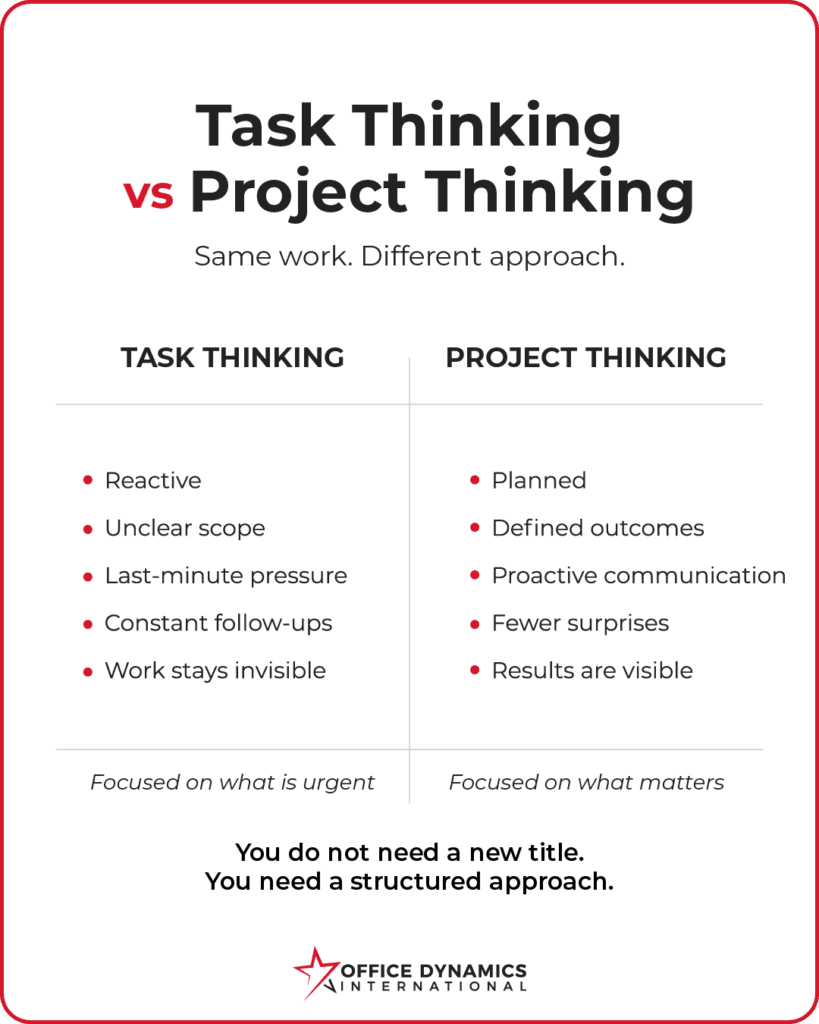
Many assistants operate in task mode by default. Tasks are reactive, immediate, and often disconnected from the bigger picture.
Project leadership is different.
A task-driven approach focuses on completing what is asked, but a project-driven approach focuses on delivering outcomes.
When you think like a project leader, you anticipate needs, sequence work logically, communicate progress, and manage expectations. This subtle but powerful shift is often the difference between being seen as support staff and being recognized as a strategic partner.
Practical Project Management Techniques You Can Use Immediately
Define the Scope and Success Criteria
Before you begin any project, get crystal clear about what success looks like.
- What is the primary objective?
- What are the required deliverables?
- What is the deadline?
- What is the budget or resource limit?
- Who are the stakeholders and decision makers?
Write this information down. It becomes your reference point and protects you from scope creep.
Break the Work Into Manageable Parts
Large projects feel overwhelming when they’re undefined. When you break them down into organized steps, you create control.
Start with major phases, list the key tasks within each phase, and then divide tasks into smaller, actionable steps.
Build a Realistic Timeline
Assign timeframes to each task and include buffer time. Delays are normal. Planning for them is smart.
Communicate Progress Consistently
A simple weekly update should include:
- What was completed
- What is coming next
- Any risks or obstacles
- Overall project status.
Reflect and Capture Lessons Learned
After the project ends, pause and debrief. Ask what worked, what didn’t work, and what you would do differently next time. Document these insights so each project strengthens your systems and skills.
Tools That Support Assistant Project Managers
Task and project management platforms such as Trello, Asana, or Monday.com help you track work and keep teams aligned.
Shared documentation tools like OneNote, Google Docs, and Microsoft Word are ideal for planning, notes, and SOPs.
Communication platforms such as Microsoft Teams and Slack help centralize conversations when used intentionally.
Remember: Tools support your thinking. They don’t replace it.
You Are Already a Project Leader
Administrative professionals are uniquely positioned to lead projects. You understand the organization, communicate across all levels, and see how the pieces fit together.
When you apply structured project management techniques to the work you already do, you gain clarity, reduce stress, and deliver stronger results. More importantly, you make your value visible.
Start with one responsibility. Define the goal. Break it into steps. Track progress. Communicate clearly.
That is project management in action.
Ready to Put This Into Action?
Download the Project Management Starter Kit for Administrative Professionals
Plan projects with clarity, communicate progress with confidence, and turn repeat work into documented processes you can reuse and delegate.
This practical worksheet-based toolkit helps you:
- Define project scope and success criteria
- Break work into manageable steps
- Track timelines and progress
- Capture lessons learned and SOPs
Key Takeaways: Project Management Skills for Assistants
- You are already using project management skills every time you coordinate deadlines, stakeholders, and deliverables.
- Project management helps you reduce stress by turning ambiguous work into structured action steps.
- Documented processes and SOPs transform your experience into reusable organizational assets.
- Consistent communication is one of the most valuable project leadership skills you can develop.
- Thinking like a project leader elevates your role from task executor to strategic partner.